
Remote MCP works. I connected the same server to both Claude and ChatGPT, let an unknown user begin onboarding in the chat, sent them through sign-in, and created a project afterwards.
What surprised me was how little of the difficult work involved the tools themselves. The hard part was everything around them: discovery documents, client registration, redirect URIs, tool names, caches, and differences between hosts that all call themselves MCP clients.
My biggest learning was CIMD — Client ID Metadata Documents. I did not know the mechanism when I started. We first tested Claude, which automatically registered an OAuth client through DCR. Only when ChatGPT showed a greyed-out CIMD option in its connector UI did I get curious. That curiosity ended with CIMD working in ChatGPT—and the discovery that Claude supported it too.
This is how those pieces fit together, and why I am now building three separate public MCP surfaces for Agentics.
The experiment
My success criteria were straightforward:
- A user adds one public MCP URL in Claude or ChatGPT.
- The client sees a small anonymous toolset and begins onboarding.
- When a tool requires identity, a real OAuth flow starts.
- Magic-link sign-in also creates the user when the email is new.
- The client retries the tool with an access token.
- The user claims a handle and creates their first Agentics project in the chat.
I wanted to test more than a clean tools/list response. A remote MCP server only becomes interesting when someone with no local setup can go all the way from a URL to a real action.
The first version connected to Claude. I later added the same URL in ChatGPT. Both could reach the same outcome, but the paths were different enough that “MCP compatible” is not a complete test plan.
The OAuth side of a remote MCP call
There are three roles in the flow:
- The MCP server is the protected resource server.
- Claude or ChatGPT is the OAuth client acting for the user.
- Keycloak is the authorization server that authenticates the user and issues tokens.
When a client calls a protected tool without a token, the server must return HTTP 401 Unauthorized with a WWW-Authenticate header. A regular MCP tool result with isError: true and “please sign in” is not enough. It merely looks like a failed tool call; it does not initiate OAuth.
The 401 points the client to the MCP server's Protected Resource Metadata. For a server mounted at /mcp, that document will typically live at a URL such as:
https://agentics.dk/.well-known/oauth-protected-resource/mcp
The document identifies the authorization server protecting the resource. The client then loads that server's OAuth or OpenID Connect discovery document. In my Keycloak setup, the practical entry point looked like:
https://auth.example/realms/agentics/.well-known/openid-configuration
That tells the client where to find the authorization_endpoint, token_endpoint, supported PKCE methods, and possibly a registration_endpoint.
It is a surprising amount of /.well-known/ before a login page appears. The payoff is that an arbitrary client can discover the full flow from the MCP URL. The MCP authorization specification and OpenAI Apps SDK authentication guide describe the same division of responsibilities.
DCR worked first
Claude first completed the flow through Dynamic Client Registration.
DCR means the client creates its own registration at the authorization server before sign-in begins. It sends metadata such as redirect URIs and the requested token authentication method to the registration_endpoint, and Keycloak returns a new client_id.
The approximate flow was:
- Claude finds the MCP server's protected-resource metadata.
- Claude discovers Keycloak's metadata.
- Claude sends a
POSTto Keycloak'sregistration_endpoint. - Keycloak stores a client registration and returns a
client_id. - Claude starts an authorization code flow with PKCE.
- After sign-in, Claude exchanges the code for tokens and retries the MCP call.
It worked, but repeated connector tests left repeated dynamically registered clients in Keycloak. DCR also requires a reachable registration endpoint with the right policies. The experience is automatic for the user, but the authorization server still creates state.
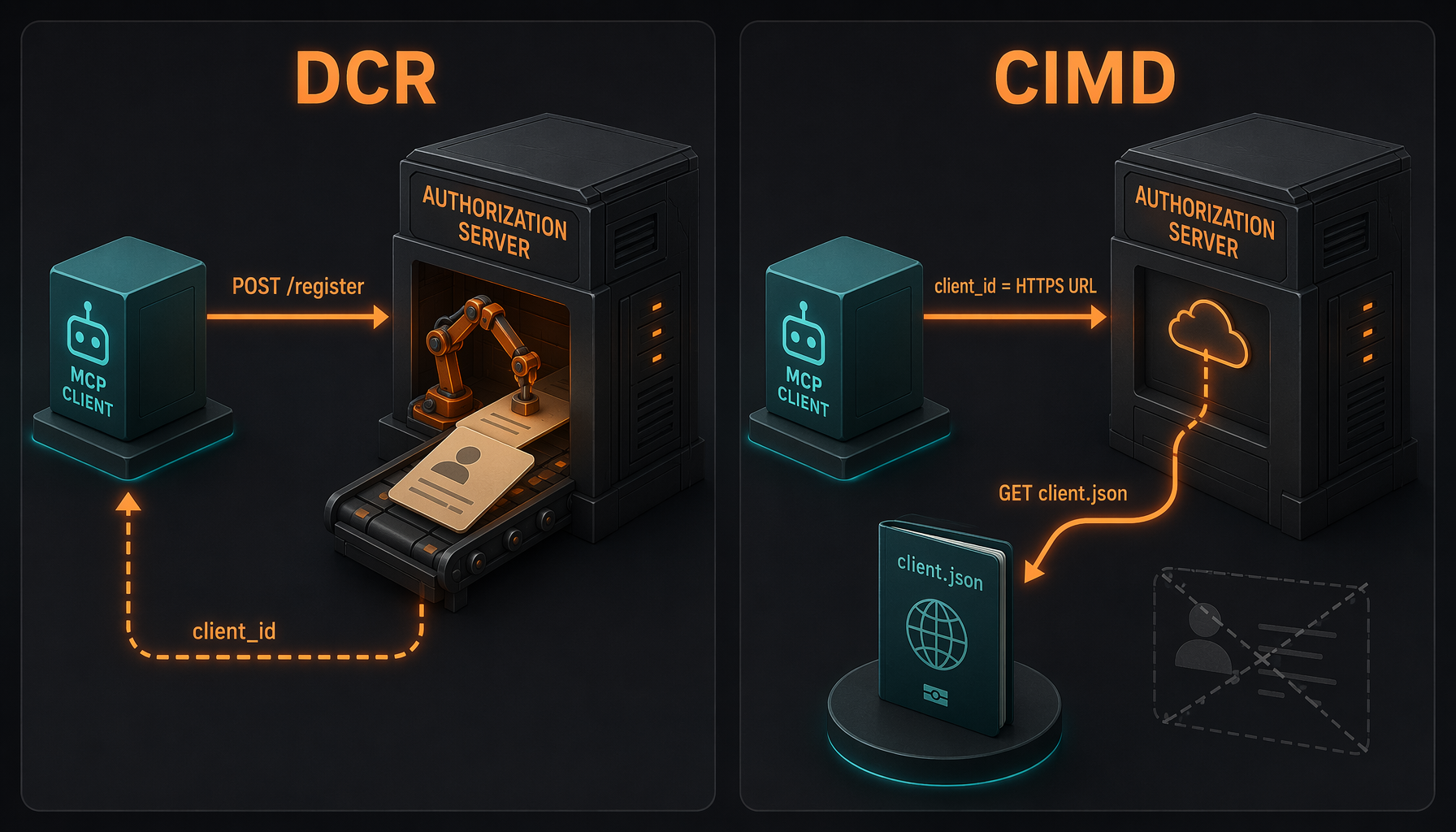
DCR creates a registration at the authorization server. With CIMD, client_id is itself an HTTPS URL from which the server fetches metadata.
ChatGPT showed me the greyed-out option
I had not planned to investigate a new OAuth mechanism. ChatGPT pointed me at one.
Its connector setup said that ChatGPT would use DCR because the server did not advertise CIMD. The CIMD option was greyed out. I did not know the acronym, so I asked about it.
Client ID Metadata Documents invert the registration flow. Instead of first posting metadata to a registration endpoint, the client uses an HTTPS URL as its client_id:
https://chatgpt.com/oauth/.../client.jsonhttps://claude.ai/oauth/mcp-oauth-client-metadata
The authorization server fetches the document and validates metadata such as redirect URIs, grant types, and token endpoint authentication. There is no separate DCR exchange to obtain a client ID. The client's stable metadata URL is its identity.
OpenAI now documents that ChatGPT supports CIMD, DCR, predefined OAuth clients, and PKCE. Keycloak likewise publishes a guide to MCP authorization server integration.
That is a natural fit for remote MCP. Major clients such as ChatGPT and Claude already publish publicly accessible metadata documents. My authorization server can validate them without every user creating another permanent registration record.
CIMD did not work merely because we advertised it
We upgraded Keycloak and enabled its CIMD feature. The discovery document began advertising:
{
  "client_id_metadata_document_supported": true
}
ChatGPT immediately switched from DCR to CIMD. That was encouraging. Then the real interoperability problems began.
ChatGPT's metadata document contained a field Keycloak's parser did not recognise. Keycloak rejected the whole document instead of ignoring the unknown metadata. A local patch moved the flow from Client metadata fetch failed to the actual sign-in page. The allowlist then needed expanding because Keycloak correctly validated every URL domain in the document, including OpenAI's asset domain.
Once ChatGPT worked, I returned to Claude. The Keycloak logs now showed a URL-based client_id under claude.ai. Claude supported CIMD too, but its document hit another edge case: a public client with token_endpoint_auth_method: none and jwt-bearer in grant_types. Keycloak rejected the entire client:
JWT authorization grant cannot be enabled in a public client
I did not want to fall back to a manually pre-registered Claude client. We followed both failures into Keycloak's source, added two small class overlays to our Docker image, and replayed the real authorization requests. Only then did CIMD work for both clients.
The sequence is what stayed with me: Claude got the first experiment working through DCR. ChatGPT's UI alerted me to something newer. Only afterwards did the logs reveal that Claude supported it too.
The complete Keycloak story—the Dockerfile patches, existing upstream issues, and how we proved the proper fixes—is in the companion post I had to patch Keycloak to make CIMD work.
MCP hosts are not identical just because the protocol is
OAuth was the largest part of the work, but it was not the only difference.
I also encountered:
- Claude's connector rejected dots in tool names.
handle.checkhad to becomehandle_checkto satisfy the host's regex. - Tool lists were cached, so a correct rename or a newly added tool could require removing and re-adding the connector.
tools/listChangedis useful, but I do not want security or correct scoping to depend on every host responding to it identically.- Remote OAuth had to be available on regular public HTTPS. A development tunnel on a separate port failed before the MCP server itself was called.
- A proxy bug forwarding hop-by-hop headers initially looked like a tunnel failure. Direct controls at every hop were required to identify the right component.
My practical conclusion is to build for the strictest client I intend to support and test the real connector flows. A synthetic MCP SDK call will not necessarily reveal a host's tool-name rules, caching, or OAuth registration behaviour.
The three Agentics MCP servers
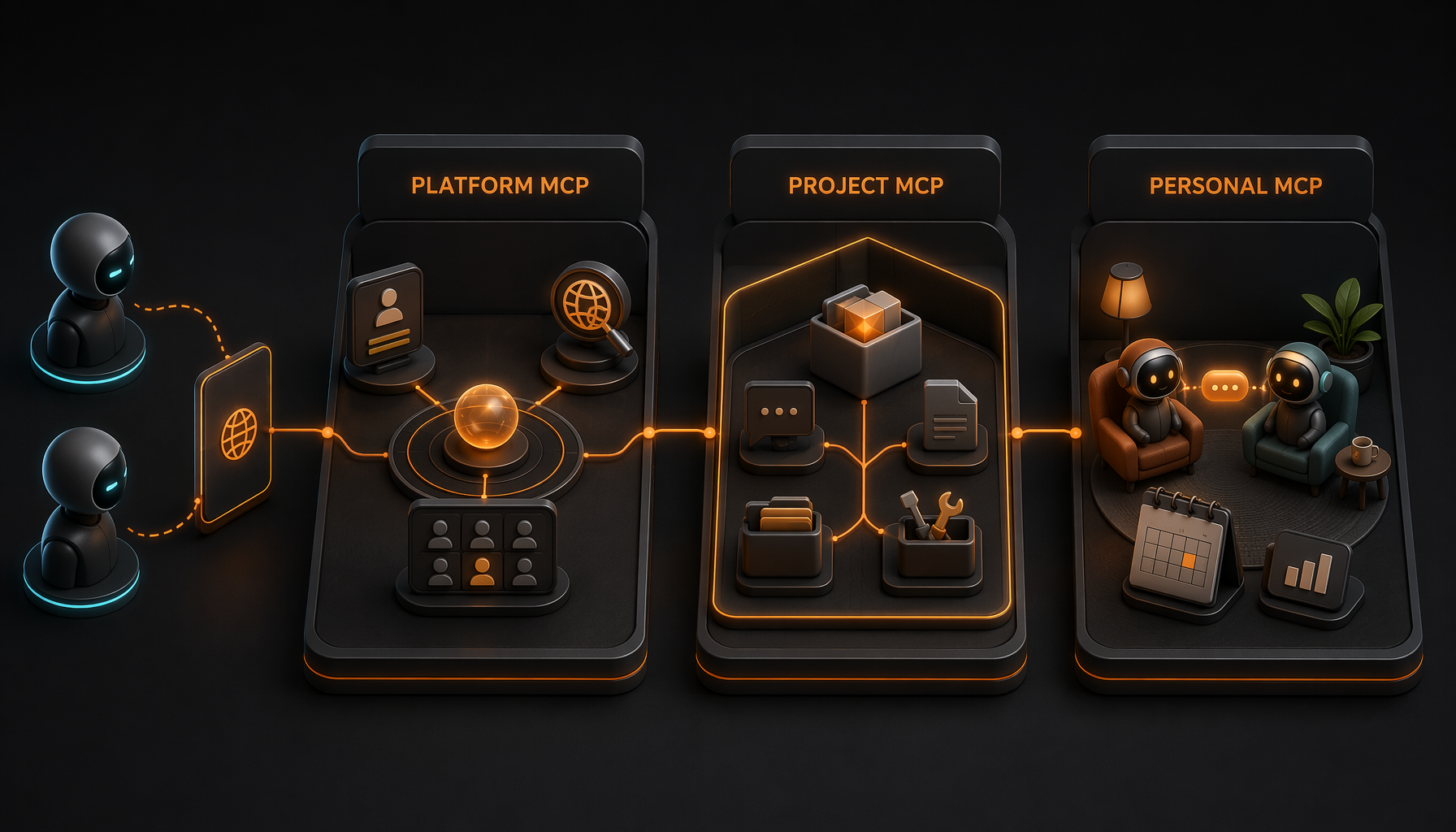
The experiment started as one onboarding server. Along the way it became clear that one giant toolbox is the wrong final design.
Agentics Platform MCP
The platform server is the entry point. A new user can discover Agentics, inspect their identity, claim a handle, create a project, and receive the relevant next URLs.
It is the hub. It should not contain every tool from every project. It helps the client and user find the right scope.
Agentics Project MCP
Every project gets its own MCP surface, for example:
/p/{owner}/{project}/mcp
I initially considered putting project_id on every tool or maintaining hidden set_active_project state. Both approaches shift responsibility onto model memory. After a long conversation, compaction, or reconnect, the server's state and the model's understanding can drift apart.
Putting project scope in the URL removes the ambiguity structurally. The server only exposes tools and data for that project. Results can still repeat the project identity as an extra guard, but the model does not need to carry an ID through the entire conversation.
Agentics Personal MCP
The personal server is more experimental:
/u/{handle}/mcp
For the owner, it is a personal assistant toolbox: messages, activities, projects, and eventually calendar and booking. For other people, it can be a controlled social surface: send a message, follow public activity, or request a meeting.
The longer-term idea is that our assistants can communicate on our behalf, but through explicit tools and permissions. My assistant must not pretend to be me. It may perform the actions I have specifically authorised.
Are Claude and ChatGPT ready for remote MCP?
Yes, in the sense that matters to me: I can build a real public MCP server, onboard an unknown user, complete OAuth, and perform actions in both Claude and ChatGPT.
No, if “ready” means that one successful test in one client proves every other client will behave the same. The platforms have different constraints, and they meet authorization servers in ways that only become visible with real client metadata documents.
That has not made me wait. I am now preparing Platform MCP, Project MCP, and Personal MCP for external clients.
But I no longer think of a remote MCP server as “some tools over HTTP.” It is simultaneously a public API, an OAuth integration, a security boundary, and a compatibility matrix.
That may be the most important lesson from the experiment.
The technical continuation is I had to patch Keycloak to make CIMD work: two real client documents, two surgical Dockerfile patches, and the path from local proof back toward upstream.