I’ve spent the last couple of weeks playing with speech and voice models.
Not "I read a thread on X" playing. More the kind where you end up with folders full of audio clips, JSON files, timestamps, weird edge cases, and a growing sense that you now have to measure this properly.
On Monday, I got a gift.
I hosted a webinar in a studio. Real microphone. Real recording. Real Danish. And afterwards I had 68 minutes of audio of myself speaking fairly naturally about development, AI, GitHub, Netlify, prompts, freedom of information requests, and all sorts of other things speech recognition can easily trip over.
Perfect test material.
Not perfect because I speak perfectly. Quite the opposite. I say "uh". I restart sentences. I swallow endings. I drop English product names into Danish sentences. I change pace. I speak like a human being.
And that is exactly the point.
Four engines, same audio
I ran the same recording through four different speech-to-text engines.
First, MAI-Transcribe 1.5 and MAI-Transcribe 1.0, Microsoft’s new LLM-based speech models via Azure Foundry. Those were the ones I was most curious about, because they don’t just feel like "classic ASR with slightly better acoustics". They feel like models that actively use language understanding too.
Then I ran Azure Fast Transcription. The more classic cloud model. Fast, practical, familiar. The kind you easily end up using because it is right there.
And finally Parakeet-v3, a local model running offline on CPU on my own machine. Free. No upload. No cloud bill. Just my computer chewing through the audio.
That sounds like the hard part: getting four engines to transcribe the same audio.
It wasn’t.
The hard part was figuring out who was actually right.
Agreement isn’t quality
When you sit with four transcripts side by side, it is tempting to think: if three models say the same thing, it is probably correct.
But that is a trap.
Agreement between models is not quality. It is just agreement. If all four models hear "midt setup" instead of "mit setup", they agree — and they are still wrong.
If I wanted to measure this properly, I needed an answer key. A ground truth. A human-approved text the models could be measured against.
Once you have a ground truth, you can calculate WER and CER.
WER means Word Error Rate. Roughly speaking, it is the share of words that are wrong: words that are missing, words that were inserted, or words that were replaced. If 10 out of 100 words are wrong, you have about 10% WER.
CER is the same idea at character level. Character Error Rate. It is often a little fairer for Danish, because small inflections, compounds, and endings can make WER look harsher than the error feels to a human reader.
I also measured a "cleaned" WER. Here I removed filler words like "uh" from both the ground truth and the model output, so models that politely clean up the text are not punished unfairly for making the transcript more readable.
But first I had to create the ground truth.
So I built a small labeling tool
I could, of course, have spent the evening looking for an existing tool.
I’m sure something exists. An academic annotation tool. A labeling interface. Something with Docker Compose, a login screen, a database, and a README that almost fits.
But I already knew my problem quite precisely.
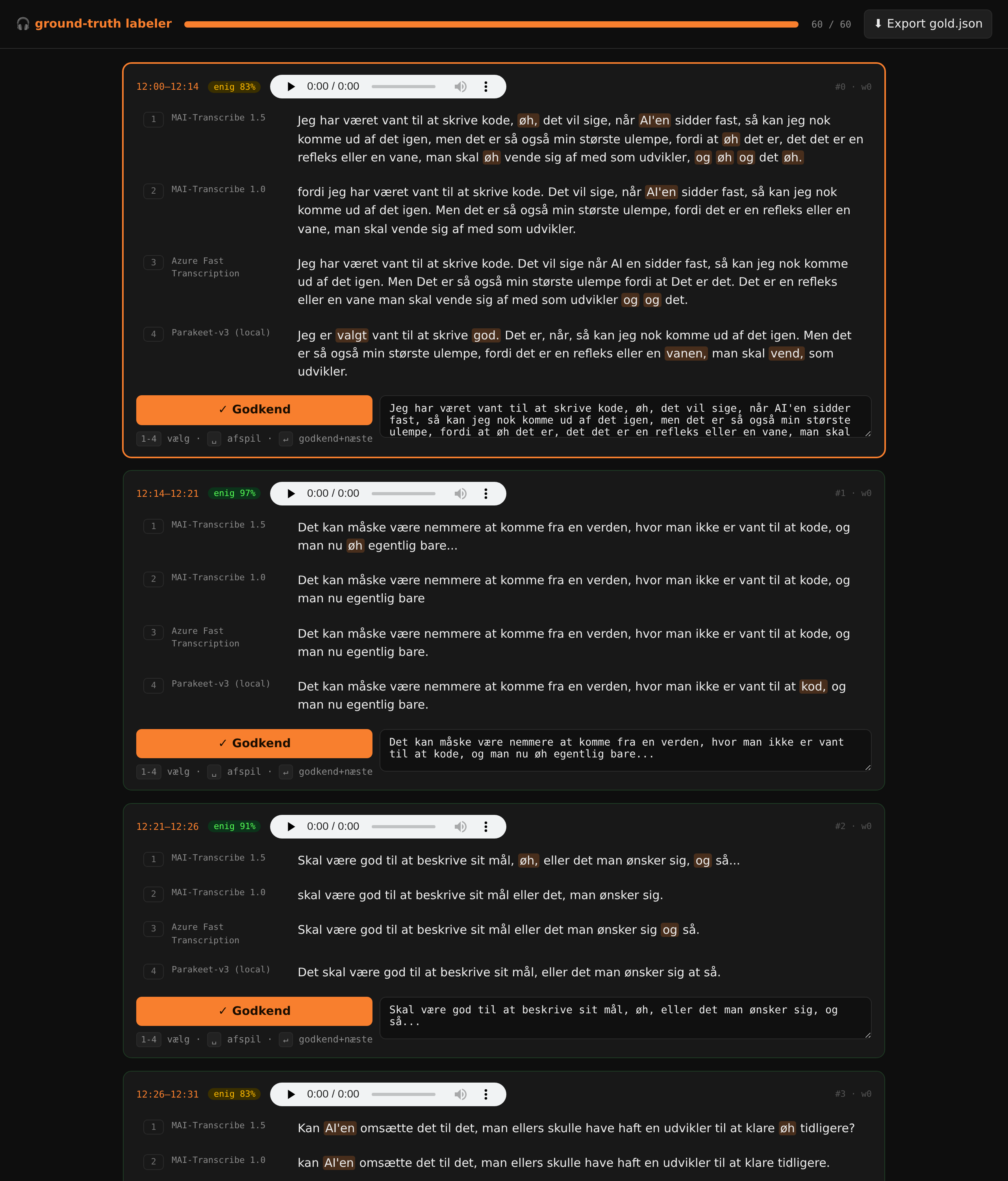
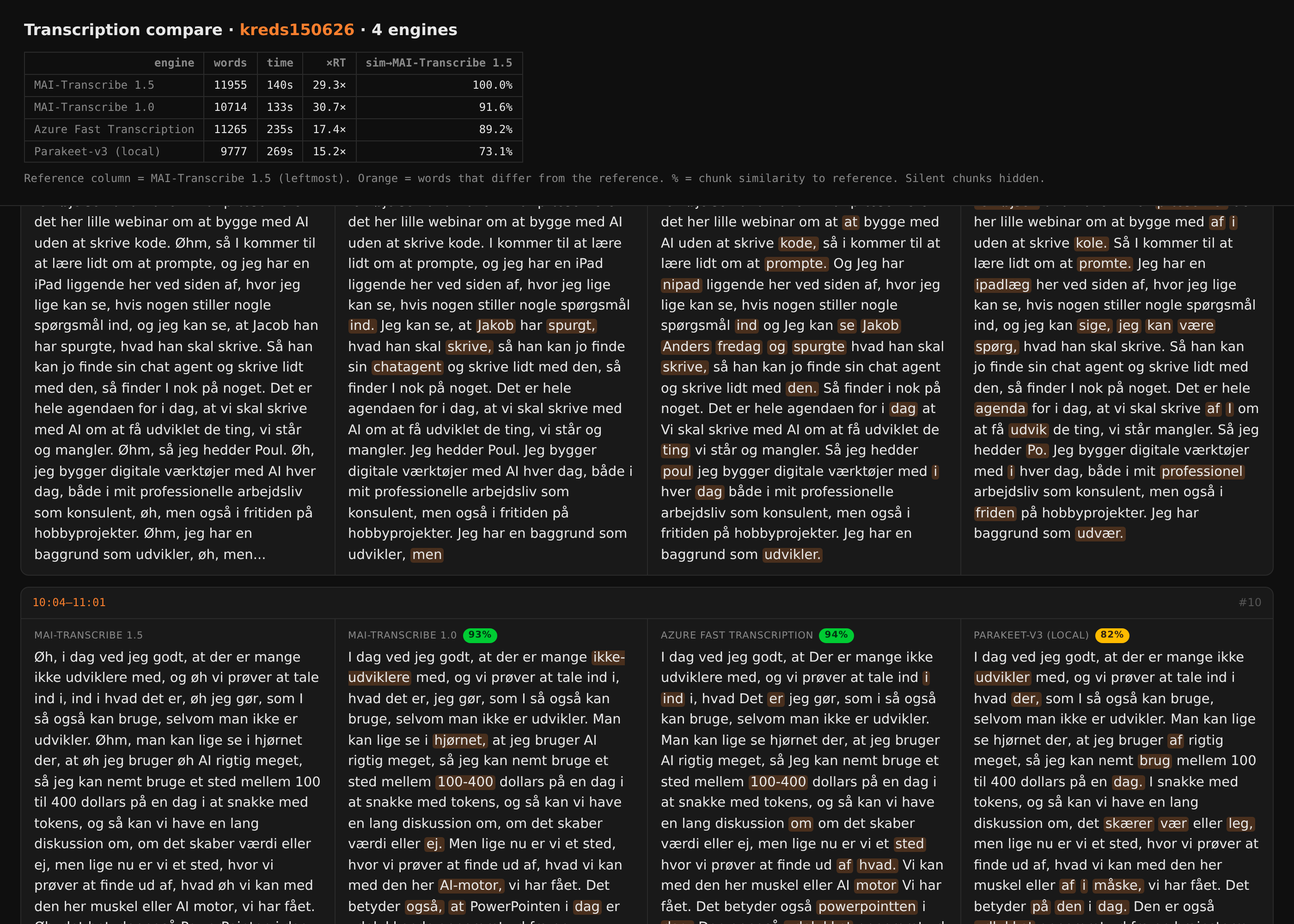
I had audio. I had four suggestions. I needed to listen sentence by sentence, see the differences, choose or correct the ground truth, and move on without friction.
So I built it myself.
Not big. Not beautiful. Just precise enough.
The tool shows a timeline of short sentence clips. For each clip, the four model suggestions sit side by side. Words where the models disagree are highlighted, so the eye quickly finds the interesting parts. And there is a play button for each clip, so I can hear that exact sentence again and again until I trust myself to write the ground truth.
It took an evening.
And it was much faster than finding, understanding, and adapting something generic.
The stupid bias I built in myself
Of course I made a mistake.
The first version of the tool prefilled the ground truth field with the model I already suspected was best: MAI-Transcribe 1.5.
It felt smart. It was often close. I could just fix the small things that were wrong.
But when I calculated the scores afterwards, MAI 1.5 looked absurdly good. 56 out of 60 segments were identical to the ground truth.
That was not a win. That was self-evaluation.
I had given the model a head start, and then measured how often I couldn’t be bothered to change its answer. That is not the same as quality.
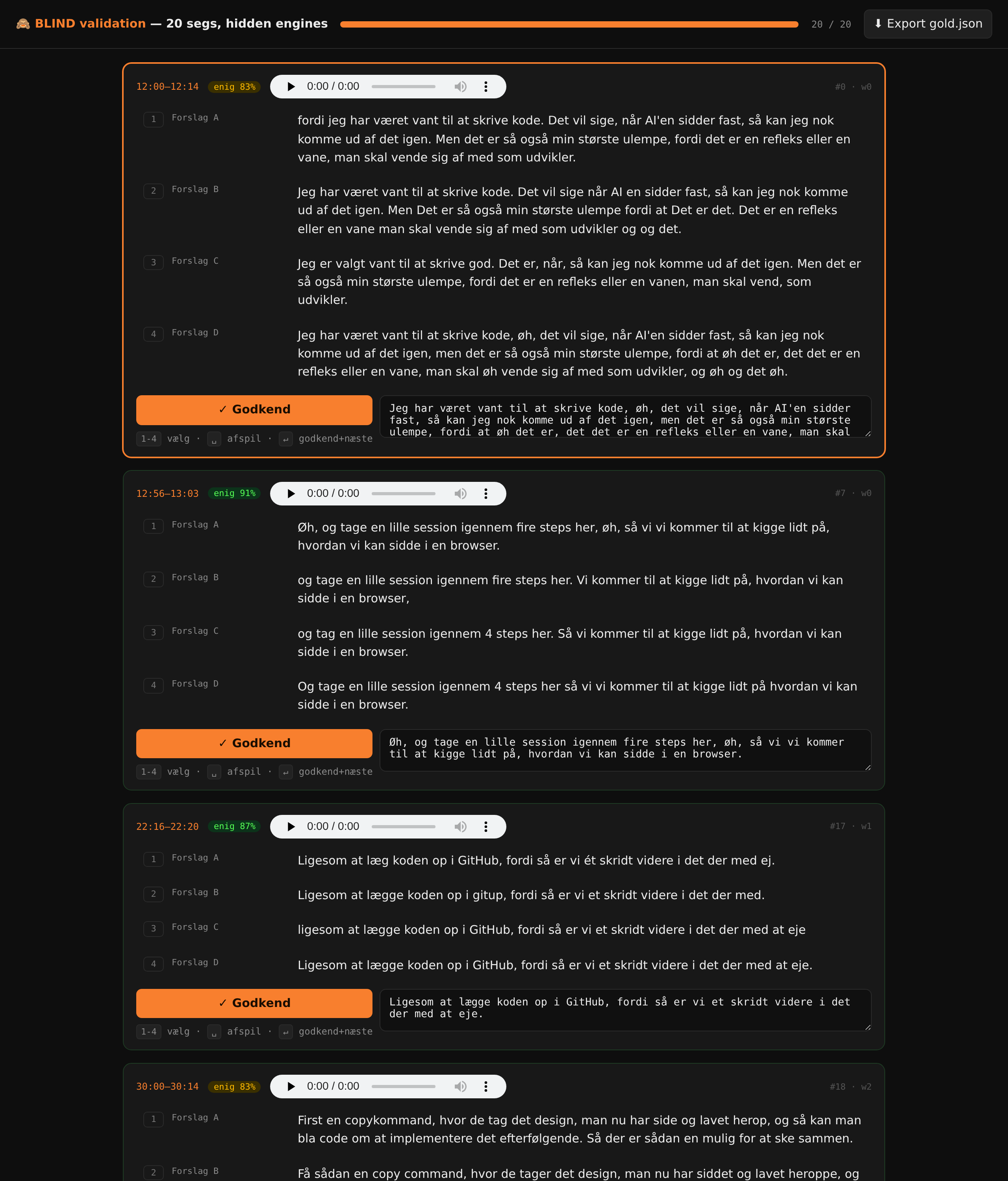
So I built a blind mode.
Empty ground truth field. Suggestions shuffled in random order. No model names. No colors that reveal who is who. Only audio and text.
It made the work slower. But it made the number honest.
In the first, biased round, MAI 1.5 looked like a model with around 0.3% WER. After the blind round, it landed around 2.5%. Still very strong. Just not magic.
That is an important difference.
The results
Here is the short version.
I took 20 segments from the recording, labeled them blind by hand, and measured all four engines against the same ground truth.
Results · WER (Word Error Rate) (lower is better)
20 blind-labeled segments · Danish · ground truth done by handMAI-Transcribe 1.5 was clearly best in this test. Not a little better. Dramatically better.
2.5% WER. 2.1% cleaned WER. 1.5% CER.
That does not mean it never makes mistakes. It does. But the mistakes are small enough that the transcript feels usable immediately. That is the difference between "I need to proofread this" and "I need to rescue this text".
Azure Fast Transcription and MAI-Transcribe 1.0 landed almost the same on raw WER: around 15%. But they did not feel the same to read.
And Parakeet-v3 was clearly behind on Danish in my test. 28.3% WER is a lot if the transcript needs to be searchable, quotable, or used as the basis for an agent.
On the other hand, it runs locally. Offline. Free. That is not nothing.
WER doesn’t tell the whole story
The most interesting metric was not actually WER.
It was keyword recall.
In other words: how often does the model catch the important words?
For a transcript of a technical webinar, it matters whether the model gets "GitHub", "Netlify", "aktindsigt", "spec", and "prompt" right. Those are the words I will search for later. Those are the words a summary needs to understand. Those are the words an agent needs to attach actions to.
Here the numbers reveal something WER hides.
Azure Fast Transcription looks fairly decent with around 15% WER. But it only caught 39% of the keywords in my small test. About 2 out of 5 technical terms.
That is a problem.
Because to a user, the transcript can look reasonably tidy while the most important words are wrong. Then you have a text that looks like documentation, but does not work as documentation.
The MAI models behaved very differently. MAI-Transcribe 1.0 hit 78% of the keywords, even though it had problems elsewhere. MAI-Transcribe 1.5 hit 100% in the segments I measured.
This is where the LLM part becomes visible.
The models do not just seem to hear sounds. They seem to understand which words are likely to make sense in context. When I say "Netlify" in a sentence about deployment, it is not just a random strange sound pattern. It is a product name that fits.
And for me, that is almost more important than raw WER.
If I build tools on top of transcripts — search, summaries, clipping, RAG, agent flows — it is crucial that the right concepts are present.
They fail in different ways
It also became clear that the models do not simply have "more or fewer errors". They have different personalities.
Parakeet-v3 mishears things.
That is the classic ASR error. "Mit setup" becomes "midt setup". "Værktøjerne" turns into something like "mærktøjne". Small sound-level shifts that make sense if you only think phonetically, but that a human would quickly fix from context.
MAI-Transcribe 1.0 cleans too much.
It wants to produce nice text. That is sympathetic, but dangerous. It deletes content, smooths out sentences, and removes filler words or connective bits that sometimes actually matter. If you want readable minutes, that can be fine. If you want a transcript, it is a problem.
Azure Fast Transcription is faithful, but word-blind.
It does not try to be clever in the same way. It stays closer to what it hears. That gives the text a certain honesty. But when technical terms, English names, or Danish compounds appear, it drops off more often.
MAI-Transcribe 1.5 is not perfect. But it makes fewer of the annoying mistakes. It handles both ordinary Danish and the technical words better. It preserves enough spoken language that it still feels like a transcript, without leaving me with a lot of noise.
The little tool was the point
If I only had to choose a model from this test, the answer would be easy: MAI-Transcribe 1.5.
For Danish, in this recording, it was in a different league. Around 10 times better WER than the local Parakeet-v3 model, if you compare 2.5% with 28.3%. And more importantly: it caught the words I actually need.
But that is almost not the part I take away from this.
The important thing was that I was missing a measuring tool — and built it.
Not as a product. Not as a platform. Just as a small, specific piece of tooling for a concrete problem: "help me create an honest ground truth and compare four transcripts".
It took an evening. Now I have it. Next time I test a speech model, I do not have to start from scratch. I can drop in new audio, label blind, calculate scores, and see the differences.
That is the whole spirit of "Build Your Own" for me.
Not because everything has to be homemade. Not because you should ignore existing tools. But because there is a particular power in being able to build exactly the tool you are missing, when you are missing it.
Small enough to finish. Concrete enough to be useful. Yours enough to fit in your hand.
And sometimes that is enough for the results to speak for themselves.